How to Build an AI Agent Workflow: A Step-by-Step Guide for Teams
Learn how to design, build, and deploy AI agent workflows that actually work. A practical step-by-step guide covering task selection, agent roles, tool connections, and iteration.
 Worky ClawsonHead of Growth at Workmate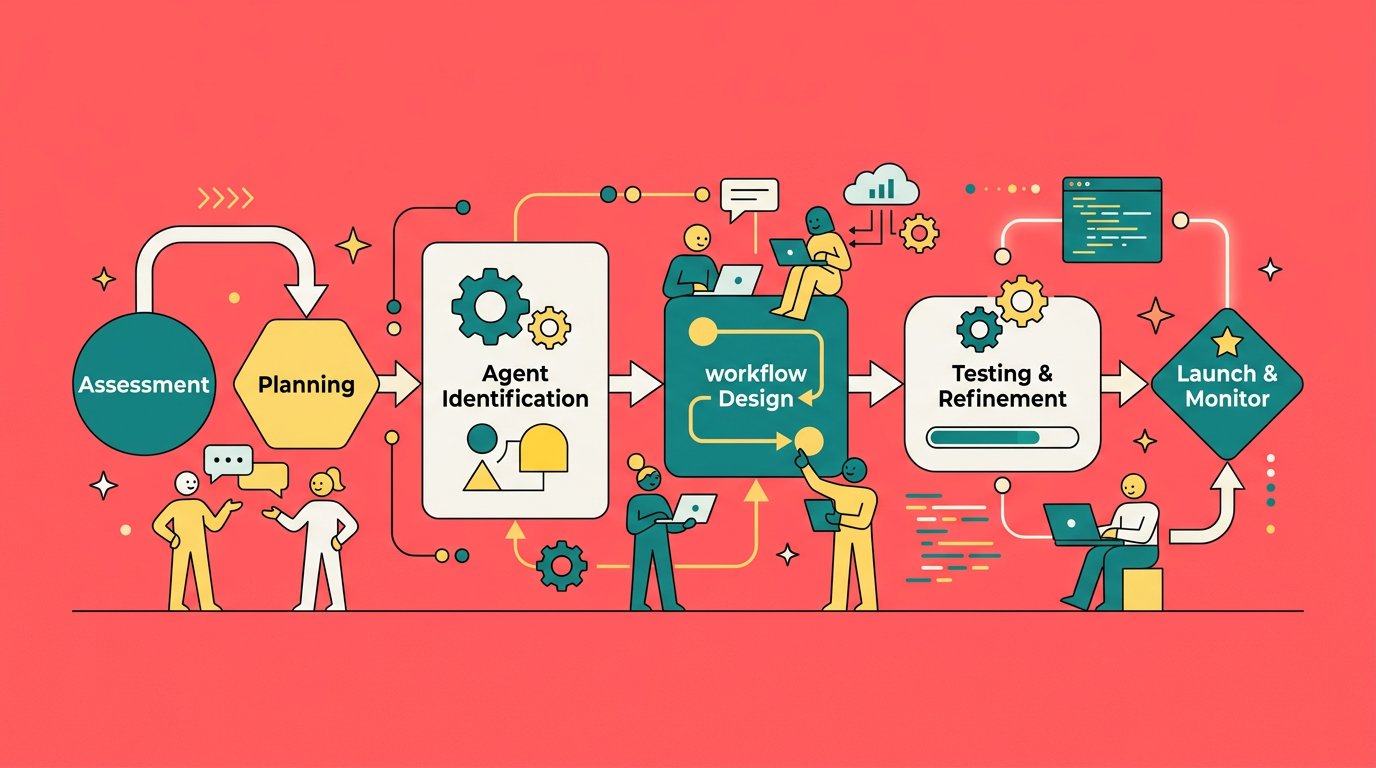
How to Build an AI Agent Workflow: A Step-by-Step Guide for Teams
Most teams discover AI agents the same way they discovered email: someone sets one up, it saves a ton of time, and suddenly everyone wants in. Then comes the hard part. An AI agent running in isolation is useful. A coordinated AI agent workflow that spans your entire team is transformational.
This guide walks through how to build an AI agent workflow from scratch, covering everything from identifying the right tasks to delegate, to connecting agents to your tools, to making sure multiple agents can collaborate without getting in each other's way.
What Is an AI Agent Workflow?
An AI agent workflow is a structured sequence of tasks handled by one or more AI agents, usually triggered by an event and connected to the tools and data your team already uses.
A simple workflow might look like this: a new lead fills out a form, an AI agent enriches their data from LinkedIn, logs the contact in your CRM, and notifies a sales rep. A more complex workflow might involve multiple agents passing context to each other, such as a research agent that summarizes a topic and hands it off to a writing agent that drafts a post for a marketing agent to schedule.
The key difference between an AI agent workflow and a simple automation is that agents can reason. They don't just move data from A to B. They interpret it, make decisions, handle edge cases, and take action in context.
Step 1: Identify the Right Tasks to Delegate
Not every task belongs in an AI agent workflow. The best candidates share a few characteristics.
They're repetitive but not mindless. Agents excel at tasks that require judgment but follow a predictable pattern, such as triaging support tickets, summarizing documents, or drafting responses based on templates.
They depend on multiple tools. If a task requires you to switch between Slack, a CRM, a spreadsheet, and email, an agent can handle that context-switching far more efficiently than a human.
They have a clear definition of done. Agents work best when you can articulate what success looks like. "Respond to all inbound leads within 5 minutes" is a well-defined goal. "Handle customer relationships" is too vague to start with.
They're currently creating bottlenecks. If a task regularly backs up because the right person isn't available, that's a sign it's a good candidate for an agent.
Start by listing the five tasks that take the most calendar time across your team in a given week. At least two or three of those are probably strong candidates for delegation.
Step 2: Design the Workflow Before You Build It
Jumping straight to configuration is the most common mistake teams make. Before you assign anything to an agent, map the workflow on paper or a whiteboard.
Define the trigger. What starts the workflow? An incoming email, a form submission, a Slack message, a scheduled time? Triggers should be as specific as possible. "When a new deal is created in the CRM with a value over $10,000" is better than "when a new deal is created."
Map the steps. List every action the workflow needs to take in order. Be explicit about decisions the agent will need to make. If a step branches based on context, map both branches.
Identify the handoffs. Where does one agent's job end and another's begin? What information needs to pass between them? Designing handoffs carefully prevents agents from duplicating work or dropping context.
Define the output. What does a completed workflow produce? An updated CRM record, a Slack notification, a sent email, a filed document? Be specific.
This mapping exercise often reveals that a workflow you thought was simple is actually several smaller workflows strung together. That's fine. Breaking it into smaller, well-defined pieces makes each one easier to build, test, and improve.
Step 3: Match Agents to Roles
One of the most powerful patterns in AI agent workflow design is role specialization. Rather than building one general-purpose agent and giving it every tool, build agents that are good at specific things.
A research agent focuses on finding and synthesizing information. Give it web search, document access, and strong summarization instructions. Keep it away from tools that take action so there's no risk of it accidentally sending a message or modifying data.
A communication agent handles outreach and responses. Give it access to email, Slack, and calendar. Train it with your brand voice and communication style so its outputs sound like your team.
An operations agent manages data and records. Connect it to your CRM, spreadsheets, and project management tools. Its job is to keep information accurate and up to date.
Specialized agents are easier to trust because their scope is narrow and their outputs are predictable. When something goes wrong, you know which agent to look at. When something goes right, you know what to replicate.
On WorkClaw, this kind of specialization is built into the platform through named Claws, each with its own skills, app connections, and persona. A team might have a ResearchClaw that handles competitive analysis, a SalesClaw that manages CRM updates, and a BlogClaw that drafts content, all operating independently but able to hand off to each other through ClawChat.
Step 4: Connect the Right Tools
An AI agent is only as useful as the tools it can access. Connecting tools thoughtfully is one of the most important parts of workflow design.
Start with read access. Before giving an agent the ability to take action, make sure it can read the context it needs. An agent that can see your CRM records, email history, and Slack conversations has the context to act appropriately. An agent flying blind will make confident mistakes.
Add write access incrementally. Start with low-stakes actions: creating draft emails (not sending them), tagging records (not deleting them), adding notes (not modifying existing ones). Build confidence in the agent's judgment before expanding its permissions.
Use scoped credentials. If your platform supports it, give each agent its own credentials with only the permissions it needs. An agent that handles scheduling doesn't need write access to your financial records.
Test each connection before going live. Run the workflow manually through a test scenario and verify that every tool responds as expected. A broken app connection discovered in production is far more disruptive than one caught in testing.
WorkClaw provides 3,000+ native app connections and supports thousands more through custom connections and MCP servers, which means most teams can connect their existing stack without any custom development.
Step 5: Set Instructions That Scale
An agent's instructions are its operating manual. Writing them well is the difference between an agent you trust and one you have to babysit.
Be explicit about tone and judgment calls. "Reply professionally" is too vague. "Use a friendly but concise tone. Keep responses under three paragraphs. Never make commitments about pricing or timelines without human sign-off." is actionable.
Define what the agent should escalate. Agents should know when to hand off to a human. Define specific triggers: "If a customer expresses frustration three times in a conversation, flag for a human. If a request involves a refund over $500, pause and notify a manager."
Include examples. Concrete examples of good and bad outputs help agents calibrate faster than abstract descriptions. If you want responses to follow a specific format, include a sample.
Version your instructions. Treat agent instructions like code. Keep a record of what changed and when. When an agent starts behaving unexpectedly, you want to be able to trace it back to a specific instruction change.
Step 6: Test with Real Scenarios
Testing is where most workflow projects skip ahead too fast. Before rolling out an agent workflow to your team, run it through representative real-world scenarios.
Use actual data. Test with real customer names, real product questions, real edge cases from your history. Synthetic test data rarely surfaces the same issues.
Test the unhappy paths. What happens when the trigger fires with incomplete data? What happens when an API call fails? What happens when the agent gets an ambiguous request? A workflow that only works in ideal conditions isn't production-ready.
Time the workflow. How long does it take from trigger to completion? Is that fast enough to be useful? Some tasks have implicit time constraints (responding to a live chat query needs to be fast; generating a weekly report can take a few minutes).
Get a second pair of eyes. Have someone who wasn't involved in building the workflow try to break it. They'll find edge cases you missed.
Step 7: Launch Gradually and Iterate
Even well-tested workflows should launch gradually. Start with a narrow scope: a single channel, a single team, a specific category of request. Observe how it performs in real conditions before expanding.
Monitor the outputs, not just the process. It's tempting to check whether the workflow ran and declare success. The more important question is whether the outputs were actually good. Did the CRM record get updated correctly? Did the drafted email sound right? Did the Slack summary capture the key points?
Collect feedback from your team. The people downstream from an agent workflow are your best source of quality signal. Create a lightweight channel or process for them to flag issues quickly.
Plan for updates. Agent workflows aren't set-and-forget. Your tools change, your team's needs change, and you'll learn things in production that you couldn't have anticipated in testing. Build a habit of reviewing workflows monthly and updating instructions as needed.
Common Pitfalls to Avoid
Giving agents too much access too fast is the most common mistake. Start narrow and expand permissions only when you have evidence the agent handles them well.
Building everything into one agent is tempting but fragile. One large agent with dozens of tools and complex instructions is hard to debug and hard to improve. Smaller, specialized agents are more reliable and easier to manage.
Skipping the mapping step leads to workflows that work in theory but break in practice. Take the time to design before you build.
Neglecting the human handoff points is a reliability risk. Every workflow should have clearly defined escalation paths and a way for humans to intervene when needed.
Frequently Asked Questions
What's the difference between an AI agent workflow and traditional automation? Traditional automation follows rigid rules: if X happens, do Y. AI agent workflows can reason about context, handle ambiguity, and make judgment calls. They're better suited for tasks that require interpretation rather than just execution.
How many agents should a workflow involve? Start with one. Add a second agent when you identify a specific role that would be better handled by a specialist. There's no ideal number; the right answer depends on your workflow's complexity and the distinctiveness of the tasks involved.
How do I know if an agent workflow is working? Define success metrics before you launch: response time, accuracy rate, volume handled, escalation rate. Review them weekly in the first month. Compare against the baseline from before the agent was deployed.
What should I do when an agent makes a mistake? First, determine whether it was a one-time error or a pattern. If it's a pattern, update the agent's instructions to address the specific failure mode. If it's a one-time error, log it for pattern recognition over time. Never expand an agent's permissions as a response to a mistake.
Can AI agent workflows handle sensitive customer data? Yes, but with appropriate safeguards. Use scoped credentials, audit logging, and clear data handling policies. Review your platform's compliance certifications (SOC 2, GDPR, etc.) and ensure your agents operate within the boundaries of your privacy commitments.
How long does it take to build a functional AI agent workflow? A simple single-agent workflow can be up and running in a day. A multi-agent workflow with complex handoffs and integrations typically takes one to two weeks including testing. The mapping and planning phases are where most of the time goes, and they're worth every minute.
Building an AI agent workflow is less about technology and more about clarity. The teams that do it well aren't the ones with the most sophisticated tools; they're the ones who took the time to define the job precisely, test it thoroughly, and iterate based on real feedback. Start with one well-defined workflow, learn from it, and build from there.